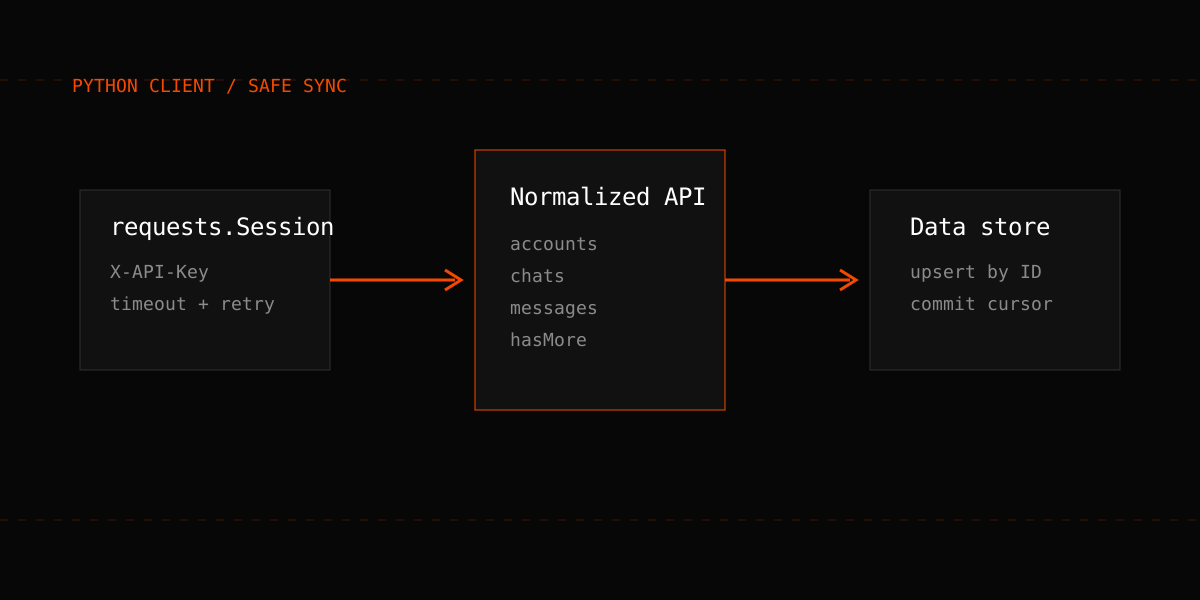
A useful API tutorial should leave you with more than one successful request. By the end of this guide you will have a small Python client that authenticates with an API key, discovers connected accounts, reads conversations, follows pagination correctly, and reports errors without leaking credentials.
The examples use The Only API's normalized CRM layer. Its base URL is https://theonlyapi.com/api/crm/{crm_id}, and every scoped request uses the X-API-Key header. Keep both values in environment variables; never put an API key in a URL, browser bundle, source file, or log.
Install and configure the client
Create a virtual environment, install Requests, and set two environment variables named ONLY_API_CRM_ID and ONLY_API_KEY. Then create client.py:
import os
import time
import requests

CRM_ID = os.environ["ONLY_API_CRM_ID"]
API_KEY = os.environ["ONLY_API_KEY"]
BASE_URL = "https://theonlyapi.com/api/crm/" + CRM_ID

session = requests.Session()
session.headers.update({
    "X-API-Key": API_KEY,
    "Accept": "application/json",
})
A Session reuses connections and gives you one place to attach the key. Do not print session.headers during debugging because that would expose the credential.
Add one request helper
Production clients need timeouts and explicit error handling. The helper below retries temporary server failures and 429 responses, but it does not retry authentication failures or malformed requests.
def api_get(path, params=None, attempts=3):
    for attempt in range(attempts):
        response = session.get(
            BASE_URL + path,
            params=params,
            timeout=(10, 60),
        )

        if response.status_code in (429, 502, 503, 504) and attempt + 1 < attempts:
            retry_after = response.headers.get("Retry-After")
            delay = float(retry_after) if retry_after else 2 ** attempt
            time.sleep(delay)
            continue

        if response.status_code == 401:
            raise RuntimeError("Missing or expired API key")
        if response.status_code == 403:
            raise RuntimeError("Key lacks access to this panel or write action")

        response.raise_for_status()
        return response.json()

    raise RuntimeError("Request retry budget exhausted")
The connect timeout and read timeout are separate. That matters when an upstream platform request takes longer than a local cache read. A retry budget also prevents a stalled dependency from trapping your worker forever.
Discover the account identifier
Do not hard-code an account ID copied from a browser session. Ask the panel for its connected accounts and select by platform or username:
accounts_payload = api_get("/accounts")
accounts = accounts_payload.get("accounts", [])

onlyfans_accounts = [
    account for account in accounts
    if account.get("platform", "onlyfans") == "onlyfans"
]

if not onlyfans_accounts:
    raise RuntimeError("No connected OnlyFans account")

account_id = str(onlyfans_accounts[0]["of_user_id"])
print("Using account", onlyfans_accounts[0].get("username", account_id))
The field remains named of_user_id for normalized routes even when a panel also contains Fansly accounts. The platform field is the reliable way to distinguish them.
Read chats and messages
The normalized chat route is GET /accounts/{of_user_id}/chats. A conversation's messages live at GET /accounts/{of_user_id}/chats/{with_user_id}/messages.
chats_payload = api_get(
    "/accounts/" + account_id + "/chats",
    params={"limit": 20, "offset": 0},
)

for chat in chats_payload.get("chats", []):
    fan_id = str(chat.get("withUser", {}).get("id") or chat.get("with_user_id"))
    if not fan_id or fan_id == "None":
        continue

    messages = api_get(
        "/accounts/" + account_id + "/chats/" + fan_id + "/messages",
        params={"limit": 50, "offset": 0},
    )
    print(fan_id, len(messages.get("messages", [])))
Response envelopes vary by route, so read the documented sibling key rather than assuming every response uses data. The CRM layer normally returns shapes such as {success, chats, hasMore}; the raw OnlyFans passthrough uses a different envelope.
Paginate by the contract, not page length
OnlyFans data surfaces use multiple pagination styles. For normalized limit/offset routes, advance by the number of items received and stop on hasMore=false or an empty page. A short message page is not reliable evidence that you reached the end.
def iter_messages(account_id, fan_id, page_size=50):
    offset = 0
    while True:
        payload = api_get(
            "/accounts/" + account_id + "/chats/" + fan_id + "/messages",
            params={"limit": page_size, "offset": offset},
        )
        page = payload.get("messages", [])
        if not page:
            return

        yield from page
        offset += len(page)
        if payload.get("hasMore") is False:
            return
For larger reporting jobs, prefer documented cached routes where available. They avoid unnecessary upstream platform calls and are easier to replay deterministically.
Add an idempotent checkpoint
A sync process should store the last successfully processed message or timestamp only after the downstream write commits. On restart, resume from that checkpoint and tolerate seeing the last record again. Upsert by the platform record ID rather than inserting blindly.
This gives you at-least-once ingestion without duplicates. It is safer than holding all state in memory, and it makes deployments or temporary 429 responses routine rather than destructive.
Know when not to poll
Polling every few seconds across dozens of accounts creates repeated empty reads and unnecessary platform traffic. Use webhooks for event-driven updates, then backfill gaps from the persisted events endpoint. If polling is required, follow the rate limits and safe polling guide and add jitter so all workers do not wake simultaneously.
For a TypeScript version of the same client, continue with the Node.js OnlyFans API tutorial. For a complete data model across both platforms, see how to build a multi-platform creator CRM.
Production checklist
- Keep the API key in a server-side secret store.
- Set connect and read timeouts on every request.
- Retry only temporary failures, with a bounded budget.
- Respect Retry-After when it is returned.
- Upsert using stable IDs and checkpoint after commits.
- Prefer cached reads and webhooks to aggressive polling.
- Record status code, route template, latency, and correlation ID; never record credentials or full personal payloads.
The documentation is the source of truth for request and response fields. Review current pricing before sizing a high-volume sync, and test the entire workflow with a non-production account before connecting an agency roster.